
Holybro DroneCAN M8N GPS
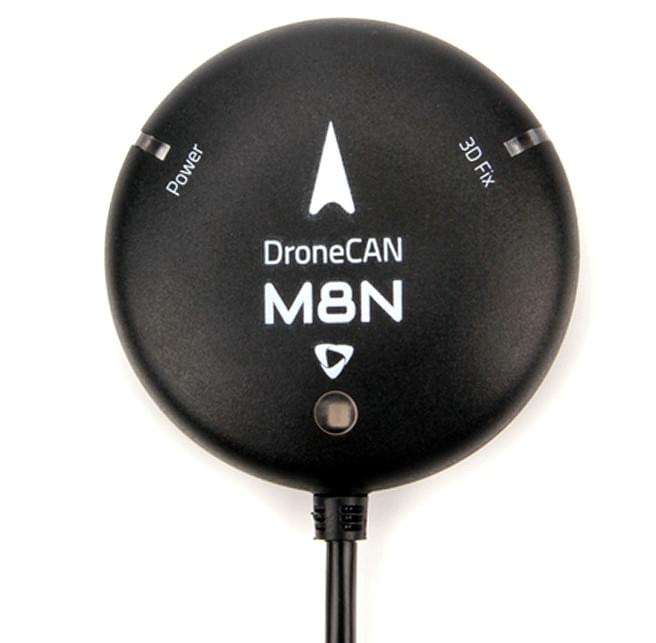
Holybro DroneCAN GPS有一个UBLOX M8N 模块,BMM150指南针,三色LED指示器。
GPS模块使用 DroneCAN 协议进行通信。 DroneCAN连接比串行连接更抗电磁干扰,从而更加可靠。 此外,使用DroneCAN意味着GPS和指南针不占用任何飞控串口(不同/附加的CAN设备可以通过CAN分离板连接到同一CAN总线。
购买途径
通过以下途径购买模块:
硬件规格
| DroneCAN M8N | |
|---|---|
| GNSS Receiver | Ublox NEO M8N |
| Number of Concurrent GNSS | 2 (Default GPS + GLONASS) |
| Processor | STM32G4 (170MHz, 512K FLASH) |
| Compass | BMM150 |
| Frequency Band | GPS: L1C/A |
| GNSS Augmentation System | SBAS: WAAS, EGNOS, MSAS, QZSS |
| Navigation Update | 5Hz Default(10Hz MAX) |
| Navigation sensitivity | –167 dBm |
| Cold starts | ~ 26s |
| Accuracy | 2.5m |
| Speed Accuracy | 0.05 m/s |
| Max # of Satellites | 22+ |
| Default CAN BUS data rate | 1MHz |
| Communication Protocol | DroneCAN @ 1 Mbit/s |
| Supports Autopilot FW | PX4, Ardupilot |
| Port Type | GHR-04V-S |
| Antenna | 25 x 25 x 4 mm ceramic patch antenna |
| Voltage | 4.7-5.2V |
| Power consumption | Less than 200mA @ 5V |
| Temperature | -40~80C |
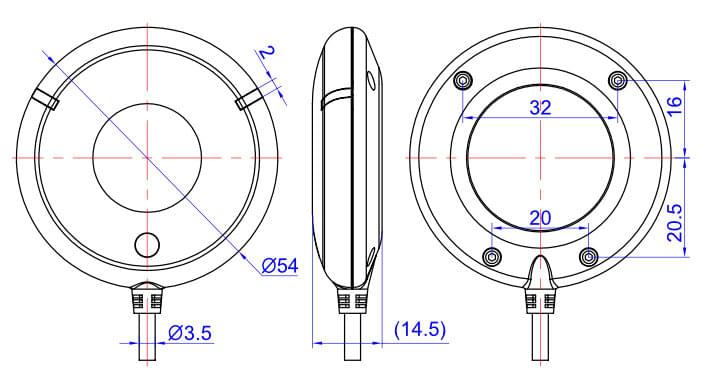
| Size | Diameter: 54mm |
| Weight | 36g |
| Cable Length | 26cm |
| Other |
|
硬件设置
挂载
建议安装方向是GPS上的箭头指向机架前方
The sensor can be mounted anywhere on the frame, but you will need to specify its position, relative to vehicle centre of gravity, during PX4 configuration.
Wiring
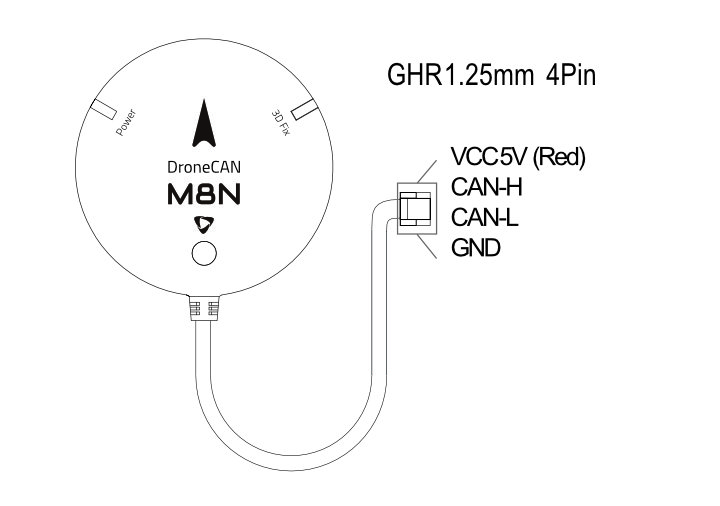
The Holybro DroneCAN GPS is connected to the CAN bus using a Pixhawk standard 4 pin JST GH cable. For more information, refer to the CAN Wiring instructions.
针脚定义
Dimensions
PX4配置
You need to set necessary DroneCAN parameters and define offsets if the sensor is not centred within the vehicle. The required settings are outlined below.
:::note The GPS will not boot if there is no SD card in the flight controller when powered on. :::
Enable DroneCAN
In order to use the ARK GPS board, connect it to the Pixhawk CAN bus and enable the DroneCAN driver by setting parameter UAVCAN_ENABLE to 2 for dynamic node allocation (or 3 if using DroneCAN ESCs).
The steps are:
- In QGroundControl set the parameter UAVCAN_ENABLE to
2or3and reboot (see Finding/Updating Parameters). - Connect GPS CAN to the Pixhawk CAN.
Once enabled, the module will be detected on boot. GPS data should arrive at 5Hz.
DroneCAN configuration in PX4 is explained in more detail in DroneCAN > Enabling DroneCAN.
Sensor Position Configuration
If the sensor is not centred within the vehicle you will also need to define sensor offsets:
- Enable GPS yaw fusion by setting bit 3 of EKF2_GPS_CTRL to true.
- Enable UAVCAN_SUB_GPS, UAVCAN_SUB_MAG, and UAVCAN_SUB_BARO.
- Set CANNODE_TERM to
1if this is that last node on the CAN bus. - The parameters EKF2_GPS_POS_X, EKF2_GPS_POS_Y and EKF2_GPS_POS_Z can be set to account for the offset of the ARK GPS from the vehicles centre of gravity.